Waterpixels and Watervoxels

Standard

Waterpixel

  • approach to simplify (large) images
  • is the reduction of the number of pixels (a.k.a image combinatorics) without the alteration of either of
    • pixel values (a.k.a spectral information or signature)
    • pixel organization (a.k.a pixel topology)
  • Practically it is difficult to satisfy the three constraints of
    • image size reduction
    • information preservation
    • structure non-alteration
  • Several superpixel paradigms exist:
    • waterpixels
      • an alternative to superpixel paradigms
      • are based on the watershed transformation
    • SLIC, Simple Linear Iterative Clustering
      • generates superpixels using k-means clustering

Watervoxel

  • Cettour-Janet et al. 2019 (link) outlines their work on Watervoxels,
  • is an n-dimensional extension of the waterpixels, as defined in the article

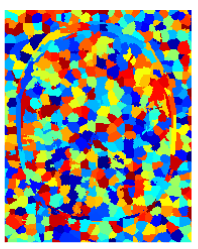
The images below summarize the result of the application of watervoxels to a 2D image and a 3D MRI image.
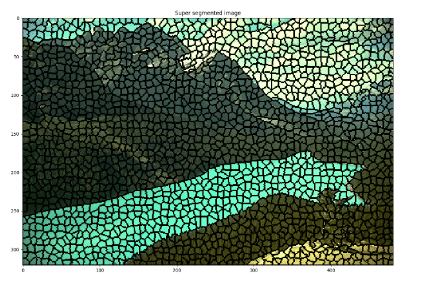
Result of the watervoxel on the 2D image
Result of the watervoxel on the 3D MRI image

What are your thoughts on watervoxels? How do you make use of them in your field?

References

Pierre Cettour-Janet, Clément Cazorla, Vaia Machairas, Quentin Delannoy, Nathalie Bednarek, François Rousseau, Etienne Décencière, and Nicolas Passat, Watervoxels, Image Processing On Line, 9 (2019), pp. 317–328. https://doi.org/10.5201/ipol.2019.250

R. Achanta, A. Shaji, K. Smith, A. Lucchi, P. Fua and S. Süsstrunk, “SLIC Superpixels Compared to State-of-the-Art Superpixel Methods,” in IEEE Transactions on Pattern Analysis and Machine Intelligence, vol. 34, no. 11, pp. 2274-2282, Nov. 2012, doi: 10.1109/TPAMI.2012.120.

Convolutional Neural Network for Oil Spill detection in Synthetic Aperture Radar Satellite Images

Image

VIM video tutorials

Standard

Over the past or so year I have been heavily using `Vim` as my main text editor for Python scripting and LaTeX editing of my CV as well as taking notes from occasionally. Moreover, over the past few months I’ve added `tmux`, a terminal multiplexer similar to screen,  to my environment to get a great combination with `Zsh`. If you love the Linux terminal as I do this is a great combination. Each of these three tools is very popular and very expandable and customizable.

`Vim` has a steep learning curve and it will take a lifetime of use to master it. So if you do not like the terminal I would recommend against using vim as it is a terminal-based text editor which heavily depends on keyboard shortcuts and is not for people who like to use the mouse. However, do not be

Searching for vim will yield a variety of text and video tutorials as well hour plus long talks. Each has its own however I recently discovered TheFrugalComputerGuy on Youtube and his videos are quite easy to follow for beginners. I recommend them to everyone especially beginners. A playlist is embedded below. Another video below it is a good way to improve your vim speed by using (or not) some features.

Also, I have previously shared vim games that help learn vim in a fun way.

And of course the VimTutor is a great way to learn about vim. Simply type vimtutor in the terminal to begin your learning journey.

Anaconda Python needs cleaning every once in a while

Standard

As a user of Anaconda python I have been receiving (Ubuntu) system warnings of low free space in my home directory. Investigating what was causing this I found out that Anaconda python had several versions of each package. The overall size of the pkgs directory was 14+ GB. After cleaning it is about 3GB.

The second largest directory was my mail in Thunderbird.

So it would be wise, especially if you are limited in disk space, to clean Anaconda. The commands I used are as follows:

 
conda clean --all
conda update conda
# just to make sure nothing is broken and
# your environment is updated
source activate <your-environment>
conda update --all
conda clean --all

Remove Exif data from Images in Linux, How to

Standard

Images usually contain metadata referred to as exif data. Nowadays this includes your camera or phone name and model. Also the location where the image was taken is also included if the GPS is enabled and you did not turn off geo-tagging.

Here’s how such exif data looks like (excluding location which I have disabled):

exiftool IMG_20171010_223446.jpg

Continue reading