Linux tip: find your bash command in less than 3 seconds

Standard

Many Linux users usually need to repeat the same command over and over again. For the newbie she will often re-write the whole command. The average use might already know that there’s something called a bash history and so she would use the up and down arrows to navigate through the history. It will take a while to find the needed command.

The more advanced user would know the trick I am about to tell you to find the appropriate command in less than 3 seconds.
Continue reading

A Linux Guide to Book Scanning (& processing)

Link

A Linux Guide to Book Scanning (& processing)
https://natecraun.net/articles/linux-guide-to-book-scanning.html

Evernote for Educators #1 – Online Physics Agenda

Standard

Since the school I currently teach at has not yet employed a Learning Management System (LMS) [1] or  a School / Student Information System [2] that involves students (eg; in regard to assignments, worksheets, announcements, & grade book, etc…) and the students are expected to depend on their physical agenda which was not effective with some students, and since most students have a smartphone or access to a computer and an internet connection I started thinking of a way to solve this issue using technology.

Surely, I had to keep all students on equal footsteps especially for students who might be behind the class due to being slow writers or simply late because of being distracted. Continue reading

Install Windows 7 on VirtualBox – Status: error 0xc0000225

Standard

Miquel Coll's avatarBlog about cooking, technology and something else

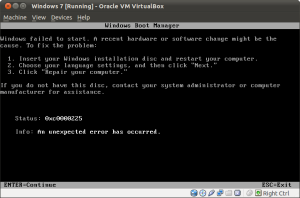
When I try to install Windows 7 on Virtual Box 4.1, I get this error:

VirtualBox - Windows 7 error Status: 0x0000225

To fix it, stop the virtual machine, go to Settings -> System and check “Enable IO APIC”

View original post

Installing Promethean ActivInspire Software On Ubuntu 12.04 or 13.04

Standard

To install the Promethean Activboard Driver and ActivInspire Software On Ubuntu 12.04 or 13.04 follow the steps below:
Note: Please note that Promethean supports only 32 bit Ubuntu systems. I have not tested it for 64 bit systems.

sudo apt-get install libjpeg62

From the Ubuntu Software Center add the following repository in “Other Sources”:

deb http://activsoftware.co.uk/linux/repos/ubuntu precise oss non-oss

Back in a terminal run:

wget http://www.activsoftware.co.uk/linux/repos/Promethean.asc && sudo apt-key add Promethean.asc

then

sudo apt-get update
sudo apt-get install activinspire activtools activdriver

Now logout and login again and try running Activinspire.