Stagefright Android MMS Vulnerability (July 2015)

Standard

A security researcher discovered a vulnerability in the Android MMS system which could be exploited to control Android phones without the user doing anything. It was reported to Google in April and a patch was release.

Unfortunately, as is the case with most manufacturers, the Android system rarely gets more than one or two upgrades.

The vulnerability affects Androids 2.2 to 5.1.1 which is the majority of smartphones currently in use.

To reduce the risk of being exploited you should disable MMS auto-retrieval in you SMS app, Hangouts app, and any other apps that deal with your SMS & MMS. To do this go into the settings of each app and disable MMS auto-retrieval. See the images below as a demonstration as well as the link at the end of the post.

For more on the topic and to stay updated follow the topic on Quora and these threads & articles:

Stagefright Android MMS Vulnerability (July 2015): What is Stagefright Android MMS vulnerability?

How do I protect my Android phone from the Stagefright vulnerability? FAQ

How To: Protect your Android device from the MMS-hack (Stagefright exploit)

Latest news about Stagefright

Distraction Free Email Composition with Gmail

Aside

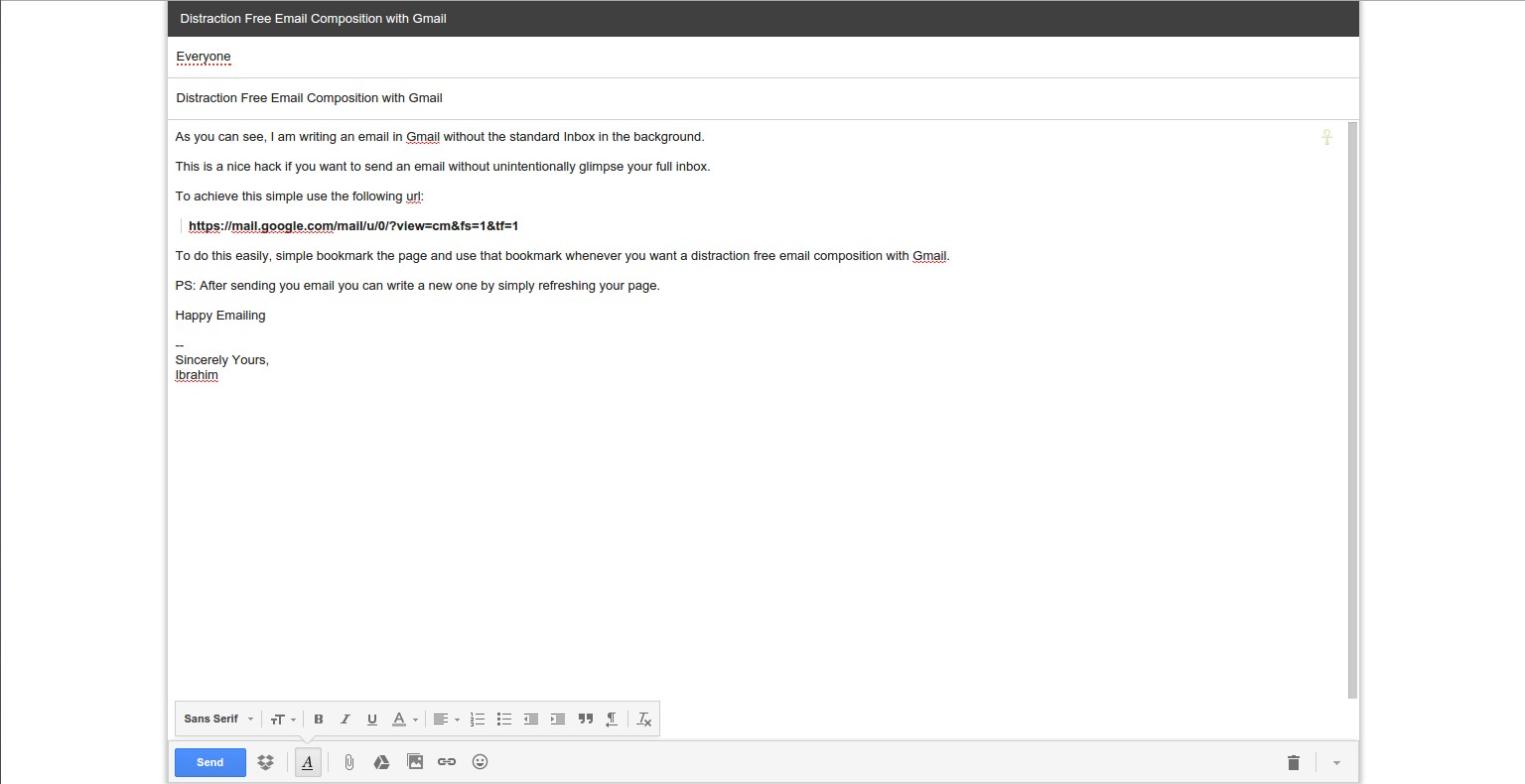
As you can see, I am writing an email in Gmail without the standard Inbox in the background. This is a nice hack if you want to send an email without unintentionally glimpse your full inbox. To achieve this simple use the following url:

​​https://mail.google.com/mail/u/0/?view=cm&fs=1&tf=1

To do this easily, simple bookmark the page and use that bookmark whenever you want a distraction free email composition with Gmail. ​​ PS: After sending you email you can write a new one by simply refreshing your page. Happy Emailing — Sincerely Yours, Ibrahim Selection_026

Tip from a reader (Marc): If you want a similar solution when replying to a email, simply pop-out the reply window then clicking the double-arrow icon in the upper right corner while pressing the shit key as shown in the images below.

An easier keyboard-based solution is Shift+r.

Solution for “Error interpreting JPEG image file (Not a JPEG file: starts with 0x89 0x50)”

Standard

I recently faced a problem opening some JPG images that I have downloaded somewhere over the internet, probably Twitter. So I though I’d share the problem and the simple solution.

When I tried opening an image I got the following error

Error interpreting JPEG image file (Not a JPEG file: starts with 0x89 0x50)

As the error states I was trying to open an image with a JPEG extension but which was not actually a JPEG image. To further verify this and know the actually format I ran this command in the terminal:

file file_name.jpg

which will give you something like this:

PNG image data, 346 x 480, 8-bit/color RGB, non-interlaced

The solution was to imply replace .jpg or .jpeg with the appropriate format, .png in this case.

References

I can’t open .jpg files, what to do?, Ask Ubuntu
Why am I getting the error: “Not a JPEG file: starts with 0x89 0x50”, StackOverflow

Glenn Greenwald: Why privacy matters [TED talk]

Standard
Some important quotes

Now, there’s all kinds of things to say about that mentality, the first of which is that the people who say that, who say that privacy isn’t really important, they don’t actually believe it, and the way you know that they don’t actually believe it is that while they say with their words that privacy doesn’t matter, with their actions, they take all kinds of steps to safeguard their privacy. [eg; Eric Schmidt, the CEO of Google and CEO of Facebook, Mark Zuckerberg]

Now, there’s a reason why privacy is so craved universally and instinctively. It isn’t just a reflexive movement like breathing air or drinking water. The reason is that when we’re in a state where we can be monitored, where we can be watched, our behavior changes dramatically. The range of behavioral options that we consider when we think we’re being watched severely reduce. This is just a fact of human nature that has been recognized in social science and in literature and in religion and in virtually every field of discipline.

society in which people can be monitored at all times is a society that breeds conformity and obedience and submission

What all of these seemingly disparate works recognize, the conclusion that they all reach, is that a society in which people can be monitored at all times is a society that breeds conformity and obedience and submission, which is why every tyrant, the most overt to the most subtle, craves that system. Conversely, even more importantly, it is a realm of privacy, the ability to go somewhere where we can think and reason and interact and speak without the judgemental eyes of others being cast upon us, in which creativity and exploration and dissent exclusively reside, and that is the reason why, when we allow a society to exist in which we’re subject to constant monitoring, we allow the essence of human freedom to be severely crippled.

Update: In early July 2015 it was announced that AshleyMadison, a cheating site, was hacked and data of users has been leaked or is being threatened of being leaked. In 2014, Gmail passwords were also leaked. And in 2013 data of 6 million users were leaked from Facebook. These are just a few examples.

Remember: NOTHING you put online is ever safe, No matter how secure systems are or how smart those are who built it. There will always be smarter people, smarter way, and new tools to de-cripple security systems. EVERYTHING you put online is there to stay.

Recommendations: If you care about the security of your accounts, and want to make them more secure, I sugges you use a password generator and manager software like KeePass and KeePassX or others (choose one that is local; I don’t trust online services like LastPass since they are equally hackable as other services). This way all you have to remember is one password.

For your convenience, use a browser with a password manager and master password like Firefox.

Also make sure to make most of your passwords at least 35-40 characters long (anything less is computationally crackable through brute-force attacks; also see Rainbow table).

Rscript to customize the R environment

Standard

A while ago I published a post on how to install some basic packages in R. This post goes further by sharing with you an Rscript (as part of another Ubuntu customization script) to install many popular R packages.

I’ve written the Rscript to be run after a fresh installation of Ubuntu. The Rscript is called by the Ubuntu customization script (yet to be published) and should install some basic and popular R packages.

Below is a Gist. For the repo click here.


####################################
## R environment customization script
# to automate package installation
# repo is maintained at http://bit.ly/r-customize-script
####################################
## To run execute in a terminal:
# Rscript r-customize.R # depends on R being installed
####################################
## Some relevant links
# Rstudio's Quick list of useful R packages: http://bit.ly/useful_R_packages
####################################
## Basic packages
#################
install.packages("devtools")
library(devtools) # to install from source (eg; github)
install.packages("downloader")
install.packages("checkpoint")
install.packages("rJava")
install.packages("xlsxjars")
install.packages("xlsx")
install.packages("data.table")
install.packages(c("Hmisc", "jpeg"))
install.packages("RJSONIO") # also required for "WDI"
# DataTables see: https://rstudio.github.io/DT/
# installs an R interface to the Js DataTables
# will ask to select a server
if (!requireNamespace('htmlwidgets') || packageVersion('htmlwidgets') <= '0.3.2')
install_github('ramnathv/htmlwidgets')
install_github('rstudio/DT')
install.packages("xtable")
# Web scraping
##############
install.packages("XML") # read & create XML docs
install.packages("rvest") # XML & httr wrappers to make it easy to download & manipulate html & xml.
install.packages(c("httr", "rjson")) # required for "Rfacebook"
install.packages("jsonlite")
install.packages("RCurl")
## Data Wrangling
#################
install.packages(c("dplyr", "reshape2"))
install.packages("tidyr")
install.packages("sqldf") # Manipulate R data frames using SQ
## Swirl
# Learn R, in R. http://swirlstats.com
install.packages("swirl")
# install_github("swirldev/swirl") # latest development version
# Visualization
###############
install.packages("ggplot2")
install.packages("ggvis")
install.packages("gridExtra")
# R interface to dygraphs
if (!requireNamespace('htmlwidgets'))
install_github('ramnathv/htmlwidgets')
install_github('rstudio/dygraphs')
# Shiny Apps
install_github('rstudio/shinyapps')
# download("https://github.com/rstudio/shinyapps/archive/master.tar.gz&quot;, "shinyapps.tar.gz")
# install.packages("shinyapps.tar.gz", repos = NULL, type = "source")
# Plotly
install_github("ropensci/plotly")
# download("https://github.com/ropensci/plotly/archive/master.tar.gz&quot;, "plotly.tar.gz")
# install.packages("plotly.tar.gz", repos = NULL, type = "source")
install.packages("maptools") # for shapefiles
# install.packages("rgeos") # required by maptools
# rMaps (still under development) # https://rmaps.github.io/
# rCharts required for some (experimental) features
if (!requireNamespace('rCharts'))
install_github('ramnathv/rCharts@dev')
install_github('ramnathv/rMaps')
# Google Vis
install.packages("googleVis")
## Leaftlet
# R package to create interactive web-maps based on the Leaflet JavaScript library
install.packages("leafletR")
# install_github("chgrl/leafletR")
install_github("rstudio/leaflet") # by Rstudio
# Documents
###########
# for Knitr
install.packages("yaml"); install.packages("htmltools"); install.packages("rmarkdown")
# Slidify & Libraries
install_github('ramnathv/slidify')
install_github('ramnathv/slidifyLibraries')
# Spatial & GIS
###############
install.packages("sp") # classes and methods for spatial data
install.packages("maptools") # Tools for Reading and Handling Spatial Objects
install.packages("maps") # Draw Geographical Maps
install.packages("ggmap") # Spatial Visualization with Google Maps and OpenStreetMap
install.packages("raster")
install.packages("mapdata")
install.packages("mapproj")
install.packages("gpclib")
install.packages("rdgal")
install.packages("Rgooglemaps")
install.packages("rgeos")
install.packages("rasterVis")
# Connections
#############
# API's
install.packages("streamR") # Access to Twitter Streaming API via R # github: https://github.com/pablobarbera/streamR
install.packages("Rfacebook") # provides an interface to the Facebook API
# Connect to Databases
install.packages("DBI") # database interface (DBI) definition for communication between R and relational database management systems
install.packages("RMySQL") # DBI-compliant Interface to MySQL and MariaDB Databases
install.packages("dbConnect") # Provides a graphical user interface to connect with databases that use MySQL
# Data scources
install.packages("Quandl")
install.packages("WDI") #github.com/vincentarelbundock/WDI
# Big Data
##########
# Packages to deal with datasets larger than RAM
install.packages("bigmemory") # Manage massive matrices with shared memory and memory-mapped files
# Medical packages
install.packages("oro.dicom")
# Machine Learning & Predictive Modeling
########################################
## caret – Classification And REgression Training
install.packages("caret")
install.packages("e1071") # needed when fitting a model in caret

view raw

r-customize.R

hosted with ❤ by GitHub